
EU AI Act for Design: What Businesses Need to Know


The EU AI Act affects design because its transparency duties are met on the screen now. Under the EU AI Act, Article 50 has applied since August 2, 2026. It requires four things businesses can see in their own products:
- AI chat and agents must say they are AI,
- AI-generated images, audio, video, and text must be marked,
- Deepfakes must be disclosed,
- Disclosure must reach a person "in a clear and distinguishable manner at the latest at the time of the first interaction or exposure."
In this article, our team explains what changes in your interface, what counts as a compliant disclosure, which design decisions carry legal weight, and what each team should review. We created a checklist for business decision-makers and a comparison of what passes review and what does not.
"Some businesses I speak with assume these rules apply to AI companies. But no! They apply to anyone using AI under their own brand. If you run an AI chat, publish generated images, or send automated decisions to customers, you carry duties even though you wrote none of the model."
Vlad Gavriluk, Founder and CEO at Arounda
Article Key Takeaways
- Article 50 of the EU AI Act took effect August 2, 2026. High-risk duties follow in December 2027 and August 2028, but transparency is not delayed.
- The rules apply to companies that use AI, not only to companies that build it.
- Disclosure must be present and accessible at initial exposure.
- The asset's compliance label is visible without user input and stays after download.
- Human editorial review removes the labeling duty for published text only, and only when a named person or company holds editorial responsibility and the review is real.
- Fines reach €15,000,000 or 3% of worldwide annual turnover for Article 50 breaches, and €35,000,000 or 7% for prohibited practices under Article 5.
- Startups and MVPs can use AI-generated design to move fast. Established businesses should invest in custom design and real imagery, because trust converts.
Why the EU AI Act Is a Design Problem
The EU AI Act places its transparency duties on the interface. Article 50 of Regulation (EU) 2024/1689 requires that a person be informed "in a clear and distinguishable manner at the latest at the time of the first interaction or exposure," in line with applicable accessibility requirements. Article 50(1) goes further: AI systems must be designed and developed so people know they are dealing with AI. The legal duty is written as a design instruction, and it is met on a screen or missed on one.
Companies that don't make AI are also affected by the rules. As an employer, you may be responsible for publishing AI-made or altered images, audio, or video that look like real people, publishing AI-made text about public interest topics, and using mood recognition or biometric categorization. Now there is a controlled area around campaign assets, support chat, and website content.
Article 50 under Article 113 applies from August 2, 2026. On June 29, 2026, the Council passed the Digital Omnibus, which delayed the high-risk regime until December 2027 and August 2028 but did not change transparency rules. The Commission released its final Guidelines on July 20, 2026.
EU AI Act UI requirements are perceptual standards. The Commission's Guidelines say that disclosure must be clear even without certain technical tools, and they take the "obvious" exception in a narrow way. It depends on where it is placed, how long it lasts, how much contrast there is, how it looks on a mobile device, and how a screen reader interprets it. Legal teams can say when a task is due. The design teams define how it looks.
EU AI Act design risk carries a second, higher tier. Article 5(1)(a), in force since February 2 2025, prohibits AI systems that use manipulative or deceptive techniques with the objective or the effect of materially distorting behavior and causing significant harm. The Commission confirms that intent is not required. Persuasion patterns in AI-driven flows become a legal question.
What are the maximum financial penalties for non-compliance?
EU AI Act penalties (Article 99) set three limits based on the company's annual global gross revenue:
- Article 5 lists behaviors that are illegal and fines them €35,000,000 or 7%, whichever is higher.
- Other obligations, including Article 50 transparency: €15,000,000 or 3%, whichever is higher.
- Incorrect or misleading information to authorities: €7,500,000 or 1%, whichever is higher.
Design Changes Required by the EU AI Act
The EU AI Act asks for changes you can see on the screen. Four changes matter most for product, brand, and legal teams:
- Label AI-generated content so people notice it.
- Explain how an AI decision was made.
- Disclose deepfakes before people watch or read them.
- Give people a way to reach a human.
Two of these apply now. Labeling and deepfake disclosure under Article 50 have been in force since August 2, 2026. Your designers, marketing, and brand teams have to mark everything.
Explanation and human oversight duties attach to high-risk systems and start on December 2, 2027. So if you design your product, do it correctly from the start to avoid redesign.
AI Act compliance design work should begin with the first group.
AI-Generated Content Must Be Labeled
Article 50(2) says that providers have to mark things. Audio, video, text, and fake pictures all need to have a mark that computers can read.
Article 50(4) clearly tells deployers what they need to do. If you use writing made by AI to educate people about something important, you should say so. The statement must be clear enough for a person to understand and see without any special tools. In terms of EU AI Act UI/UX design, that means a label that can be seen at first glance, not a note at the bottom or on the terms page. The label should stay on the file even if it is downloaded or shared again.
Our Arounda team recommends making the label a part of the image, so add it to the exported file and check how it looks in different crop sizes on social media sites. When someone shares the picture again, the caption that was added in the CMS is erased. So, fix it as well.
AI Decisions Must Be Explainable
Article 86 gives a person affected by a decision made with a high-risk AI system the right to clear and meaningful explanations of the role of the AI system in the decision-making procedure and the main elements of the decision taken. That right is tied to high-risk systems, so it follows the postponed high-risk timeline.
But! GDPR Article 22 applies now. People can request human involvement, express their opinion, and challenge totally automated legal decisions. Virtually every automated decision screen needs a justification and a way to appeal.
The Arounda team suggests: Write the explanation before screen design. The interface won't help if your team can't summarize the important points in two phrases. After drafting the copy, size the component.
Deepfake Disclosure
Article 50(4) says that deployers have to show proof of any picture, audio, or video that was made or manipulated artificially but looks real. In marketing, that includes AI words, AI faces, and cut video of real people. It also warns that writing on the internet can make you responsible, even if it's not aimed at EU citizens. EU AI Act design compliance here is mostly about where things are put. The statement has to be clear before someone believes what it says.
The Arounda team suggests: At the storyboard stage, decide what information will be shown, and set aside safe space in the frame for the label in the same way that you do for subtitles. Adding it after the fact generally means editing it again or using a weak, low-contrast overlay.
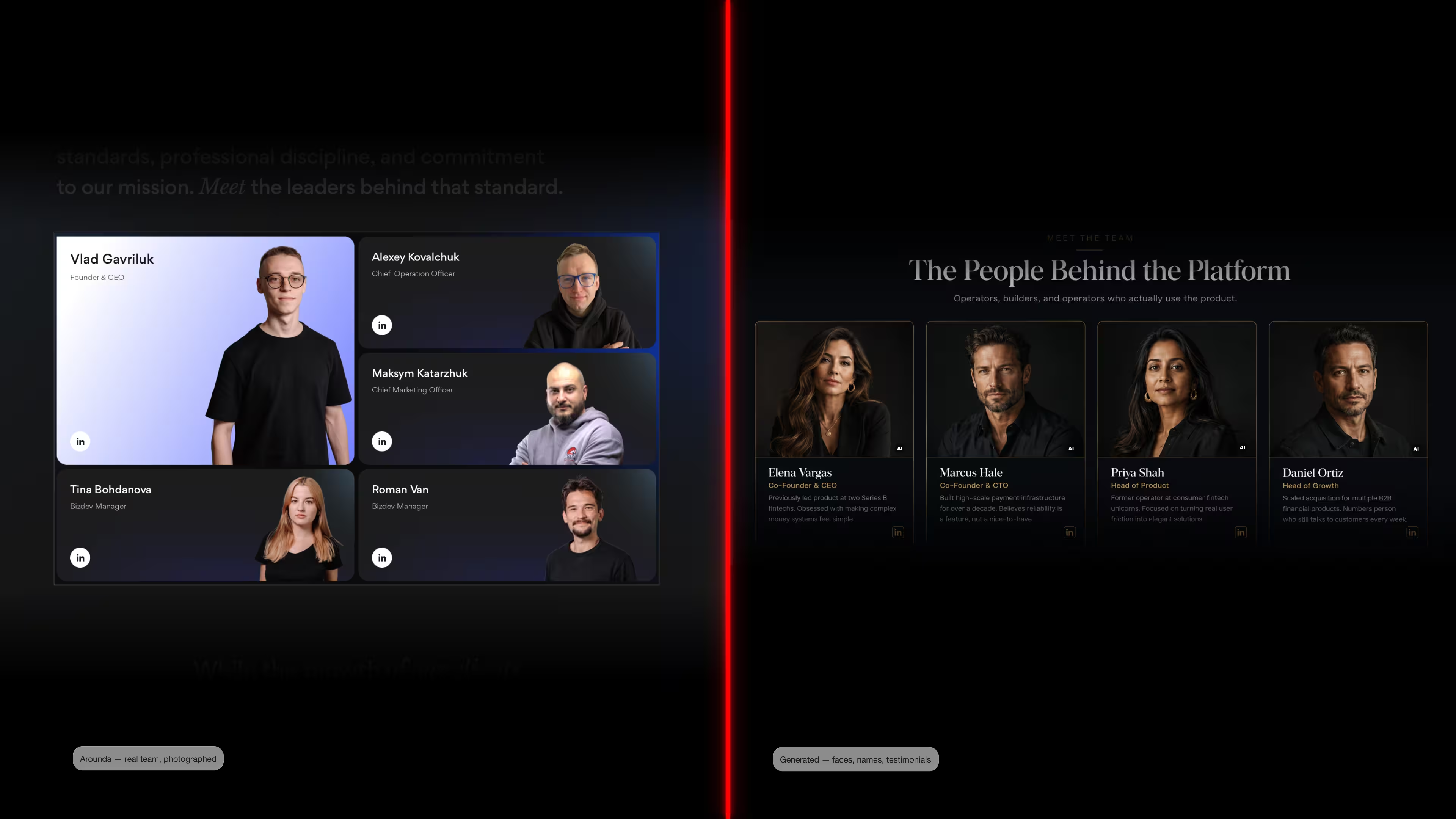
How does this work in practice? If you need to showcase a team or an individual, we recommend using real photos. That’s exactly what we did on our website when introducing our team (the left side of the illustration). But if you don’t have any photos or want amateur shots to look professional and consistent in style, that’s what a “deepfake” is. Each photo must be labeled as “generated by artificial intelligence” (as shown on the right side of the illustration).
Human Override Access
A person must be able to watch over high-risk AI systems, and they must be able to ignore, overrule, or reverse the output and stop the system, according to Article 14. This starts on December 2, 2027, for systems in Annex III and on August 2, 2028, for AI inside regulated products. It's part of the design. Common EU AI Act design patterns include:
- A visible "talk to a human" exit in AI chat
- A reversible action with an undo window
- An appeal link attached to the decision itself
What if a human reviews AI-generated content?
Under Article 50(4), AI-generated text published to inform the public does not need a label if it went through human review or editorial control and a named person or company holds editorial responsibility.
Human review does not eliminate the other responsibilities. Deepfakes still require disclosure. Chatbots must still identify themselves as artificial intelligence. And, for high-risk systems, having a human in the loop is a must. Thus, review is a responsibility rather than an exception.
"If you rely on the editorial exception, provide a workflow that proves it. Evidence is created by naming a reviewer, adding a timestamp, and keeping track of changes. Build it inside your CMS."
Vlad Gavriluk, Founder and CEO at Arounda
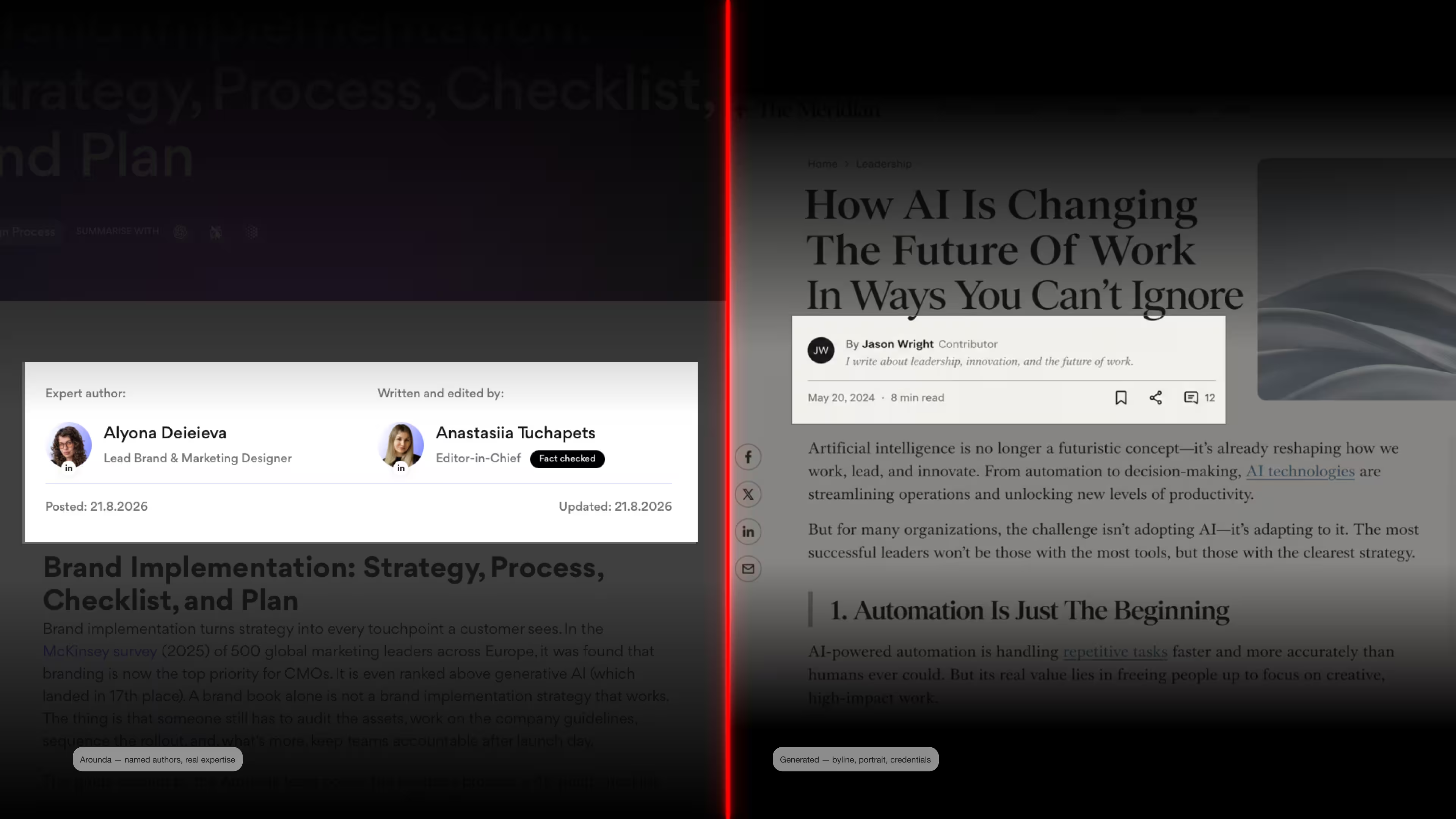
Here’s how we did it at Arounda (left side of the illustration) compared to how it often (but not always) looks when content is generated by artificial intelligence (right side of the illustration). We include real names, job titles, the people responsible, and their actual photos. Our text is fact-checked, written at an expert level, includes quotes from our designers, is edited, and serves as a valuable source of information for business decision-makers. Explore more examples of how we write in our blog.
How do I design human oversight without ruining the user experience?
Keep the exit quiet but findable. Three rules work well.
- Put the path for people where there is friction. After a wrong answer, before an action that can't be undone, or right after a rejection.
- Cut down on overrides. It takes less trust to use an undo window than to open a support ticket.
- Make the AI label persistent and compact. Popup windows are distracting, get closed, and leave no trace after the first view.
What Counts as a Compliant Disclosure (And What Doesn't)
The disclosure must be understandable and perceivable by a person, through visible or audible labels, without any special tools. Everything else is detail about placement, timing, and contrast. This is the part of the EU AI Act for design work that you can get wrong on the first attempt.
What Counts as Clear
- Easily seen without any work. The Code of Practice says that the label should be easy to see right away, without the user having to do anything. Without having to click, hover, or expand the screen.
- At the initial point of touch. For example, a bot that claims to be AI before the first conversation.
- Placed alongside the content. For text, the disclosure appears above or near the headline. For video, at the start and at regular intervals. For audio, include a voiced disclaimer at the beginning.
- Written in plain language. The Commission's icon guidance asks for plain wording and no abbreviations other than "AI."
- Readable long enough. If the disclosure appears for a limited time, it must stay visible long enough for users with cognitive or processing difficulties to read it.
- Attached to the asset. The label stays in place when the file is downloaded, cropped, or reshared.
- Accessible. Sufficient contrast, a real text layer or alt text, and correct announcement by a screen reader.
- Complete for agents. An AI agent must say both that it is AI and on whose behalf it is acting.
What Doesn't Pass
- A line in the footer. Placement below the content fails the first exposure test.
- Wording inside Terms and Conditions. A disclosure a user has to open is not a disclosure.
- A very small mark on a picture. The perceivability standard is broken by low contrast.
- A mark on video that blinks for one second. That's not readable enough for momentary display.
- A tooltip or info icon. The Code of Practice doesn't allow these because they need interaction.
- A one-time popup. Users dismiss it, and it leaves nothing behind on later visits.
- "Powered by advanced technology." Vague phrasing does not tell a person they are dealing with AI.
- A caption added in the CMS. It disappears the moment the asset is reshared.
- Assuming it is obvious. The Commission reads the "obvious" exception in Article 50(1) restrictively, because it removes transparency from the user.
UI Examples
AI transparency UX patterns are easier to judge on concrete surfaces than in the abstract, so our brand and product designers prepared examples of what is okay without disclosure and what’s not.
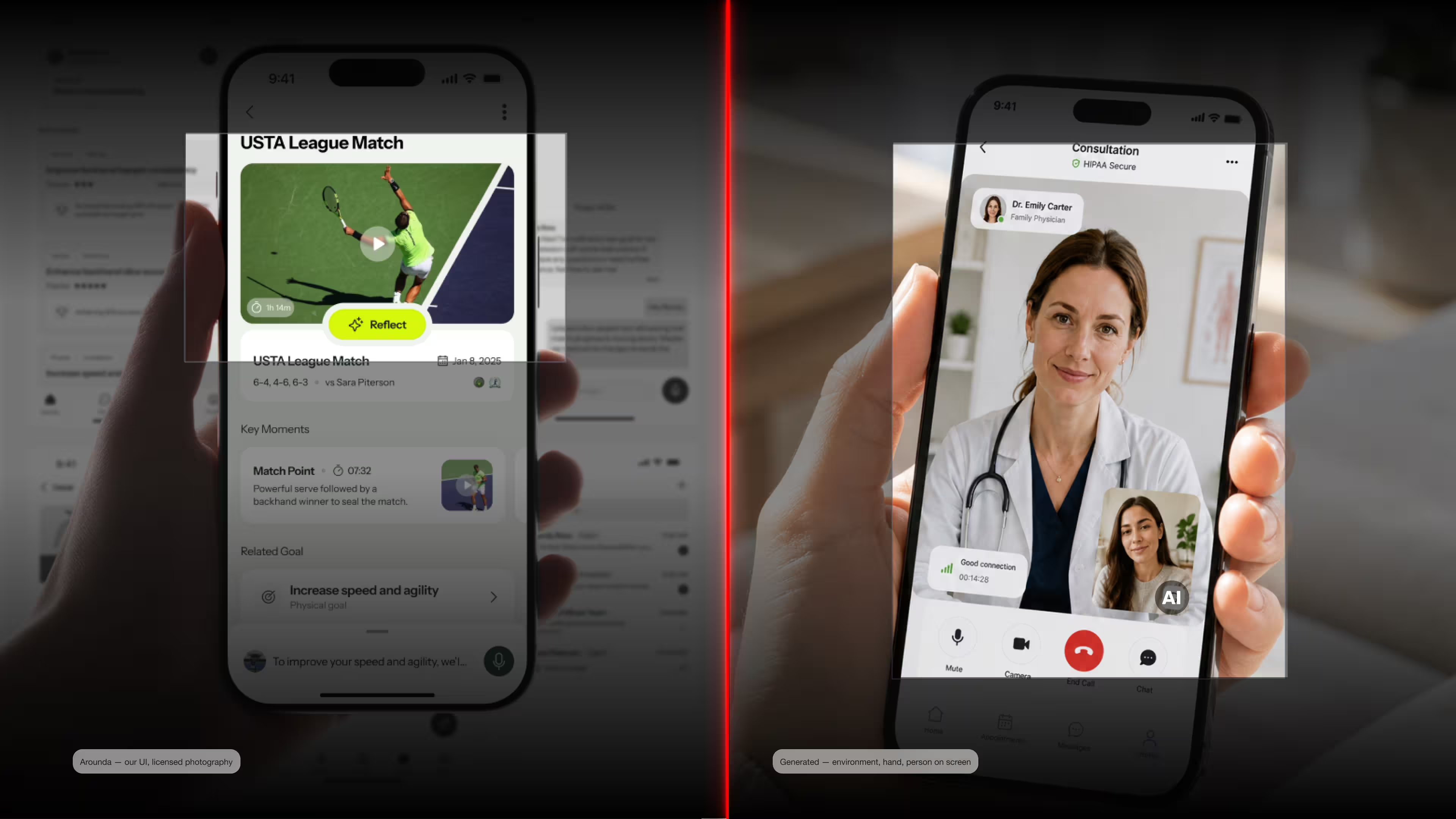
An example of comparing real mobile app design and design created using artificial intelligence. On the left, we show our real case (a mobile app design for tennis players) compared to how to label a generated medical app interface design if you are not showing real people. Concepts like this appear on landing pages to show what an app looks like inside, in marketing materials, in pitch decks, and in instructions.
The viewer's opinion matters. A real product screenshot illustrates a state. A created interface displays a false state. Labels keep claims honest when a created picture is presented as a product customers may buy today, especially in healthcare or finance.
These days, many companies are creating websites or landing pages using artificial intelligence to save time and money. This is acceptable if you have a startup or a small MVP for testing an idea. But after a successful launch, we recommend creating a custom design for your website or landing page to avoid undermining trust. Because as soon as your customers see the “AI” label, they can drop off due to a lack of trust in your product. This is especially true in the healthcare, finance, insurance, wellness, and other industries where trust plays a key role.
Our designer demonstrates how the Arounda team designed a WordPress website with a custom user interface and licensed photos that do not require attribution (on the left in the illustration). He also provides an example of a healthcare website created using artificial intelligence, featuring a generated environment, people, and images (on the right in the illustration). It includes the appropriate attribution.

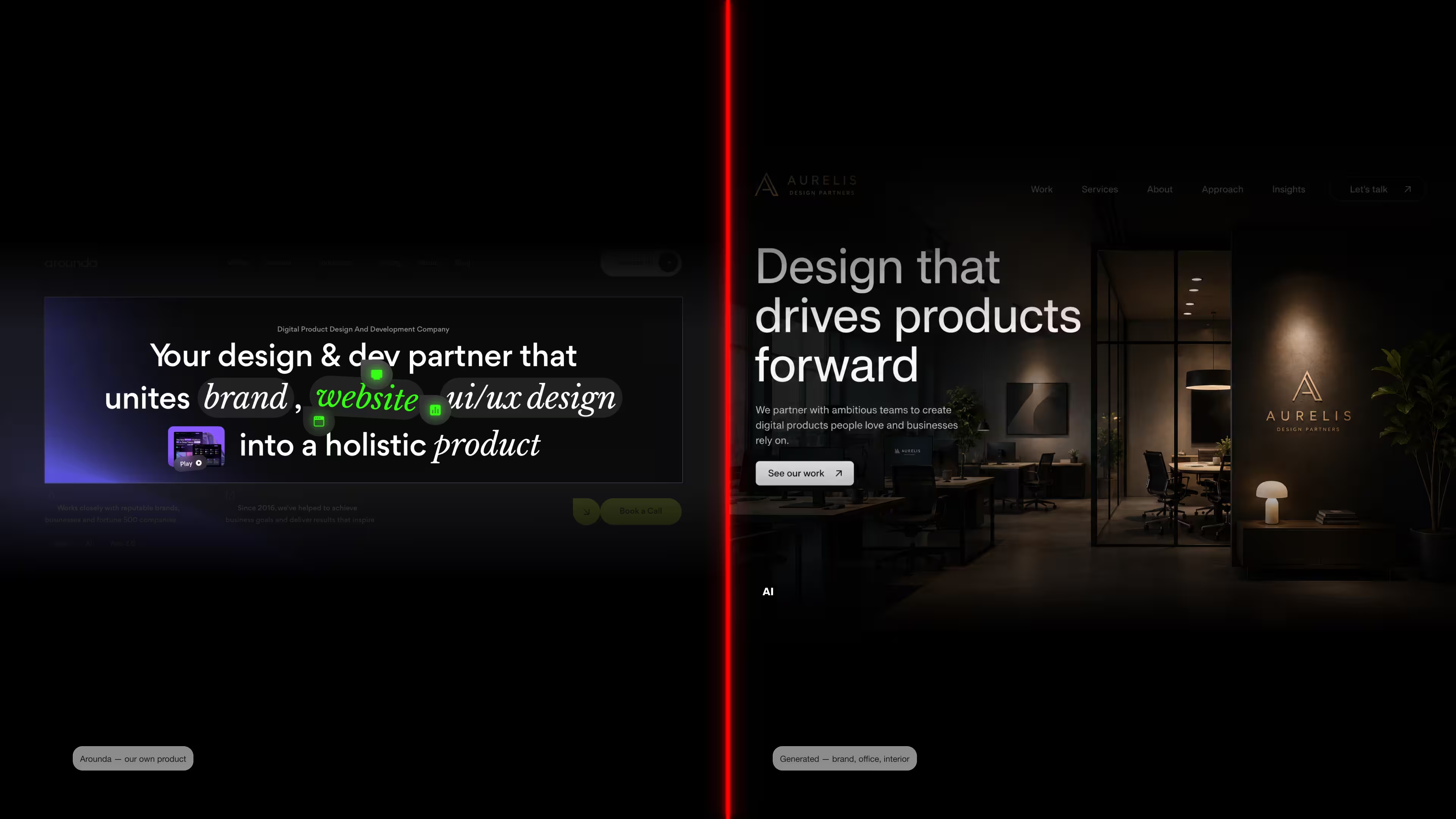
Also, take a closer look at the hero section of the home page on the website. The left side of the visual is an Arounda hero section design. It's a custom solution. The right side of the visual shows the AI-generated text and imagery. And yes, it must be labeled. The same question of trust. Because users understand that it’s not the real interior of your office (AI labeling), and the text does not explain who you are and what you do. It may affect your drop-off, engagement, retention, and conversion rates.
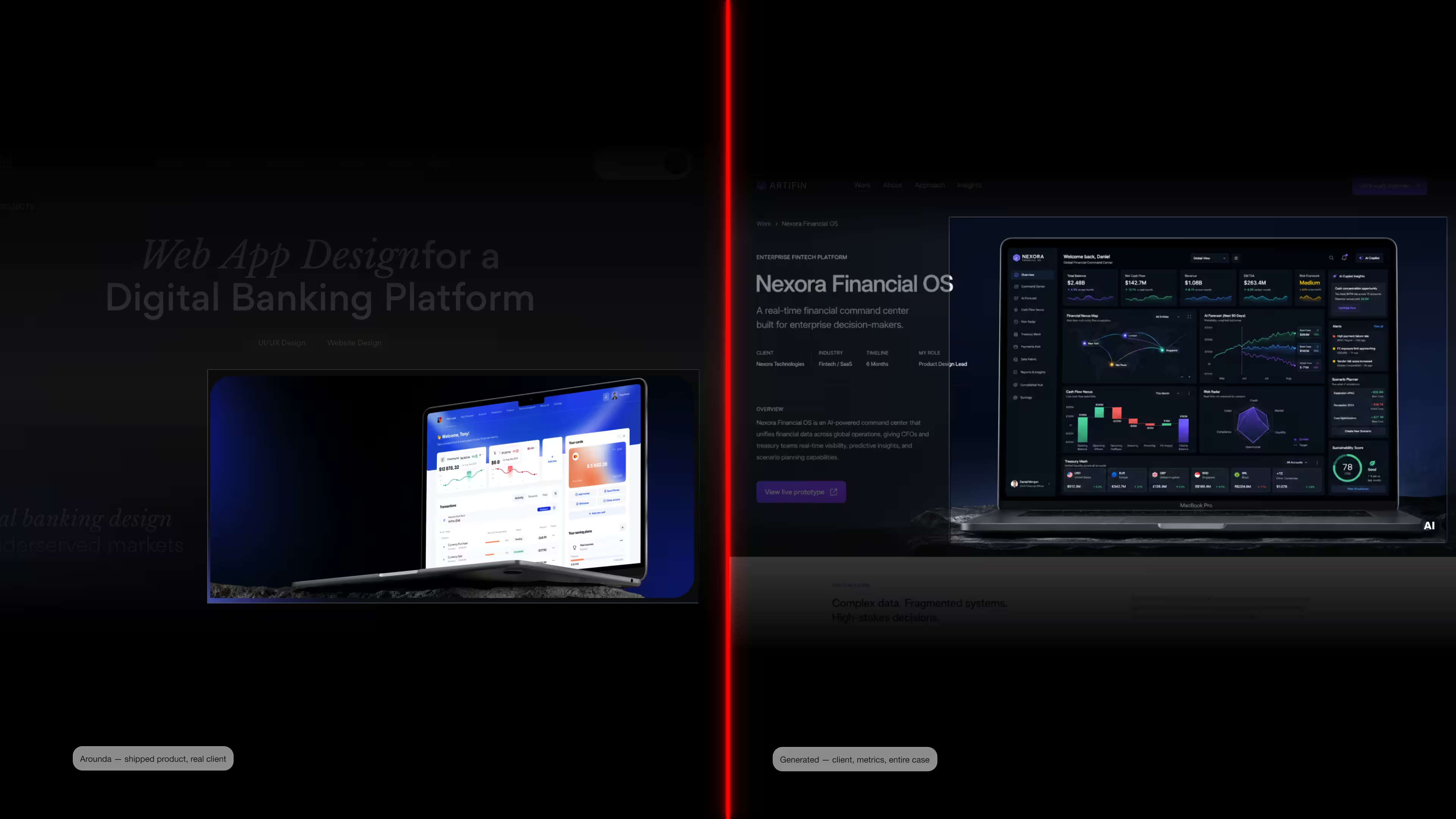
Another example is a case study. Businesses now create more and more AI-generated case studies to look more trustworthy and expert. And now they should label such cases. On the left side, you can see our case study Piifund with a real dashboard from a real project. On the right side, we show the labeled AI-generated case study with an overwhelmed dashboard (this is how AI tools usually do).
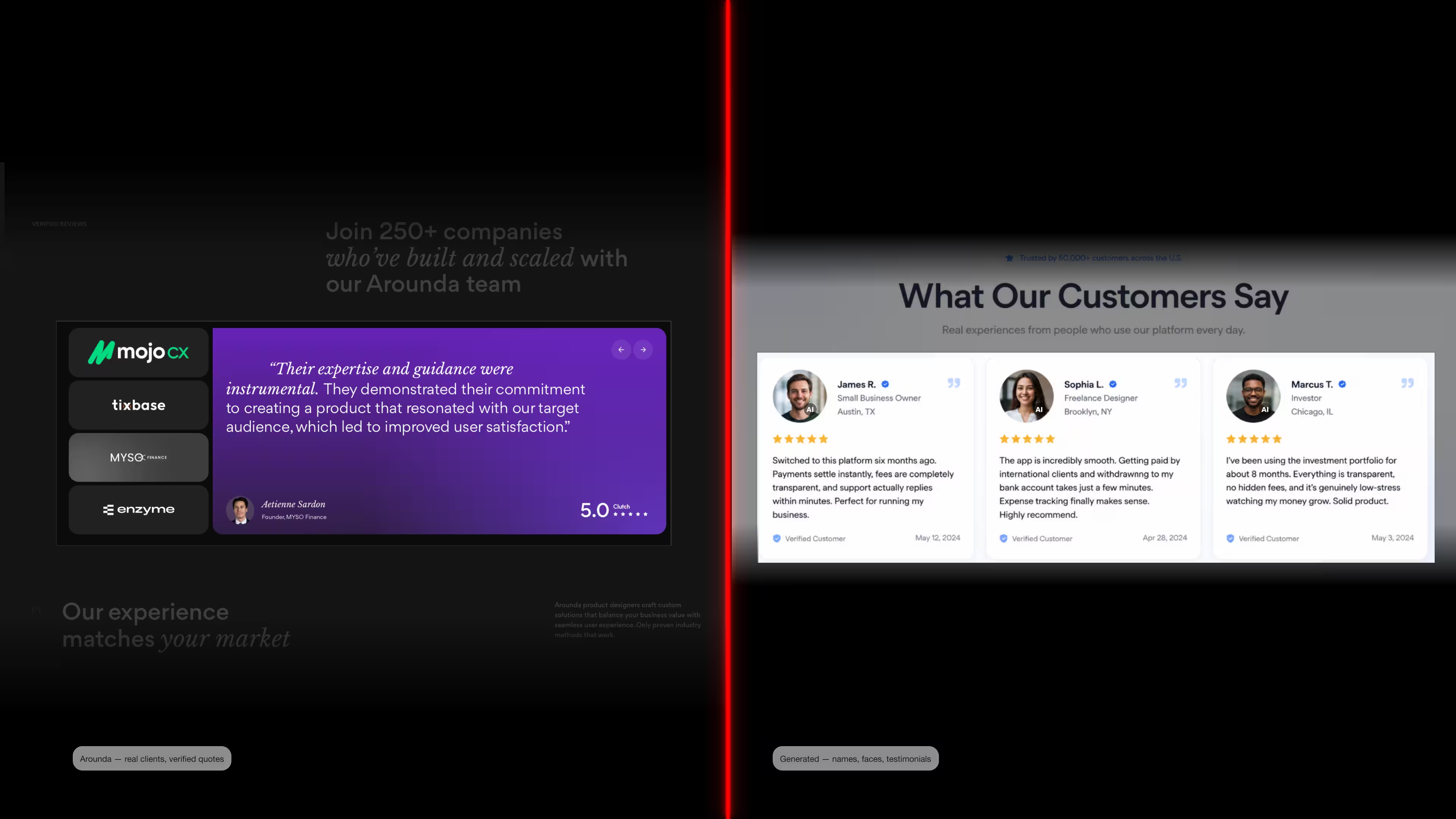
Let’s talk about reviews. Startups often post fake reviews on their websites or landing pages to build trust and retain their audience. You’ve probably seen examples like these (on the right in the illustration)! First names without last names, very general and abstract reviews, overly perfect photos, and no sources to verify them. From now on, such reviews must be labeled as shown in the illustration.
How do you do it right? Look at the left side of the illustration featuring our Arounda example. These are reviews from our real clients. We didn’t make anything up. We selected real projects, spoke with our clients, asked them to provide honest reviews, and published them on Clutch, since this platform verifies everything (the company, location, people, job titles, etc.) and clearly indicated that it’s a Clutch review. Yes, it’s a more complicated step, but it’s much more reliable. Do you agree?
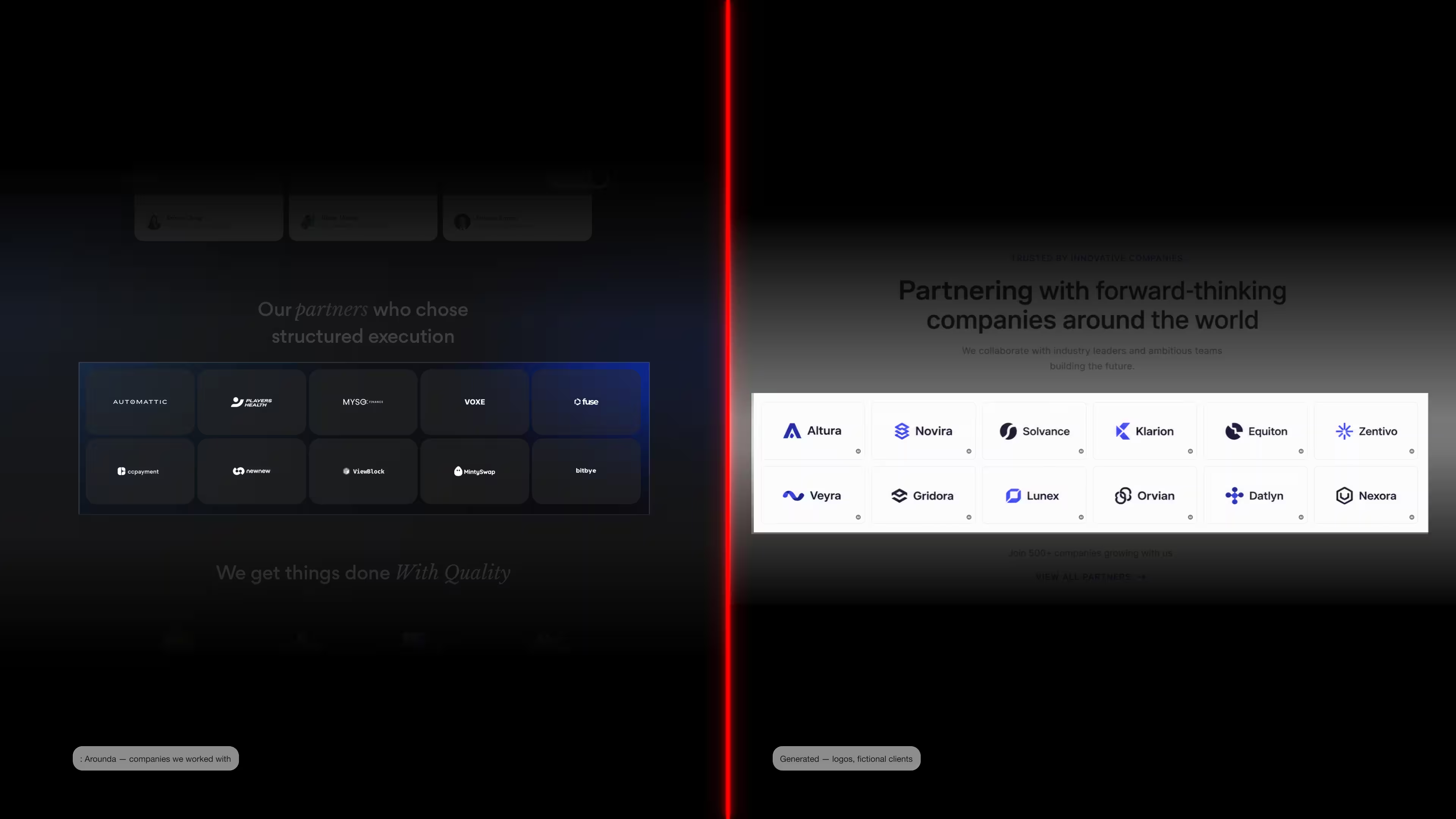
The same applies to the clients you’ve worked with. Many companies showcase fictional or overly famous clients to appear more reputable and competitive, but now you must list each one. Don’t forget about liability, either.
Our advice is to feature real clients, even if they’re small or not very well-known, and you can be sure everything will be fine.
We gathered even more examples connected to text disclosure.
“AI transparency by design is a component decision. Define one label token with fixed contrast, minimum size, and safe-area rules, then apply it across chat, media, and decision screens.”
Yevhen Tykva, UI/UX and marketing designer at Arounda
Design Decisions That Carry Legal Weigh
EU AI Act design choices with legal consequences include a label that shows up with low contrast, a statement that the user can hide, or a caption that disappears when the file is exported. Examine it more closely.
Missing Labels Are a Problem
The most common failure is having no label at all. This happens when a team thinks the AI is obvious or that someone else took care of it. The "obvious" exception in Article 50(1) is narrowly interpreted, and the Commission's Guidelines back this up. This is because it takes away the user's ability to see what's going on. Also, missing labels are the easiest to prove because anyone can take a picture of the screen.
We asked Yevhen Tykva, UI/UX and marketing designer at Arounda, the questions clients raise when we start designing AI disclosure labels.
Does every AI tool need a label?
Yevhen: No. The duty under Article 50(1) applies to systems that interact directly with people. A chatbot, a voice assistant, an avatar, an AI agent. Internal tools do not fall under it. If your team uses AI to forecast demand or clean a database, there is no user on the other side to inform.
The second duty isn't the same. Generating output is covered by Article 50(2). If a system makes fake pictures, sounds, videos, or text, that output needs to have a mark that can be read by machines, even if no one talked to the system to get it. So, mark the information people receive and the interactions people have.
How do labels behave upon asset download?
Yevhen: The Commission's guidance on the EU icons says that the disclosure should be embedded directly into the content and stay visible when the content is reshared or downloaded. So a label added at the page level is not enough. If someone right-clicks and saves the image, the label has to come with it.
It has two layers, and each one fails in its own way. The layer that can be seen is a pixel in the file, so it can be downloaded but not always cropped. The layer that computers can read is called metadata, and metadata is weak. It can be lost during compression, a CMS re-upload, the processing of a social site, or even a screenshot. That's why the Code of Practice calls for a multi-level approach.
The export chain should be tested. Take the asset through each stage of its journey, including partner deck, email client, social crop, and CMS upload. The true label is whatever endures through all of them. All other labels are exclusive to Figma.
Do minor edits need labels?
Yevhen: Usually not. Article 50(2) excludes minor edits that do not substantially alter the content. For example, spell-checking, color correction, or cropping images. The Guidelines note that AI-assisted translation is considered standard editing, but summaries and substantial rewrites must be marked.
My rule for teams: if AI has changed the content of the text, mark it. If it has only changed the appearance of the text, it’s fine. In cases that fall somewhere in between, mark it. An extra mark costs you nothing, but failing to mark it will cost you a recheck.
Popups Are Not Enough
A modal is the default reflex, and it is one of the weakest options available. The Code of Practice expects disclosure to be immediately perceivable without user interaction. A popup requires an action to clear it, and once cleared, it leaves nothing behind.
Four problems come up in review:
- It disappears.
- Users dismiss it without reading. Consent-banner habits mean people close modals reflexively.
- A popup on the page says nothing about the asset someone downloads from it.
- It competes with other overlays. Cookie notice, newsletter prompt, chat launcher, AI disclosure.
A persistent inline label, small and always visible, outperforms a modal on every one of these points. The EU AI Act UI requirements reward permanence over prominence.
What Design Solution Will Not Pass Review
- Dark text on a dark background is a common regression after a theme update.
- A disclosure that fails at mobile width. Truncation at 320px removes the part that names the AI.
- A tooltip or "info" icon (because it requires interaction).
- Editorial sign-off with no record (because the Article 50(4) exception needs real human review and a named responsible person).
- An agent that names itself but not its principal.
- A label in one language on a multi-language site.
What Every Business Should Review
Article 50 compliance fails between teams if you don’t prepare the process. Legal knows the rule, design owns the screen, marketing ships the asset, and nobody owns the handover. Start by agreeing who reviews what. Business owners, legal, product design, marketing, and brand teams should know and understand the EU AI Act and take responsibilities according to their roles.
Now, take a closer look at the design part.
Find Every AI Touchpoint
Create one list that includes chat and voice assistants, AI search, generated product photos and videos, AI-written text, translated and summarized material, recommendation modules, automated emails, and any emotion or biometric characteristic. Keep track of whether a person interacts with each entry and whether it generates information that others may see. The first answer invokes Article 50(1). The second invokes Articles 50(2) or 50(4).
Design Consent for Emotion Tracking
People who use systems that recognize emotions or biometrics must tell the people who are exposed to them about them according to Article 50(3). Article 5(1)(f) goes even further and outlaws drawing conclusions from emotions in schools and at work. Biometric data is processed by the system where it is allowed to, so GDPR generally needs a legal reason and often clear consent. The job for the designer is to show what the system finds, why it finds it, and a way to decline that work.
Make Labels Visible
Users decide what is visible. Check the contrast between the two themes, make sure the text can be read at 320px, and see if a screen reader reads the label. Check that the label shows up before the user does anything with the information and stays there when they come back. After that, look at the export path. Get the asset, cut it up for social media, and see what stays. A label that's only on the live page doesn't cover the file that was saved from it.
Where exactly must the AI labels be placed?
The Commission's guidance on the EU labeling icons says that the disclosure should be embedded directly into the content, perceivable at first exposure, and still visible when the content is reshared or downloaded.
- Text above or near the headline
- Video labeled at the start and repeated
- Audio disclaimer at the beginning
Use Official EU Icons Where Possible
The European Commission publishes free icons for labeling AI-generated content. Each comes in black, white, and two transparency variants, as SVG and PNG. A shared symbol needs less explanation than a custom badge, and it survives translation. If you use your own label instead, the Code of Practice expects the capitalized acronym "AI" to appear in it.
Test If Users Notice the Disclosure
Conduct a brief unmoderated study. Show the screen for a few seconds, then ask the participant what they saw and who created the content. If most people don’t notice the attribution or describe the content as human-created, then this disclosure does not meet the standard, regardless of what is specified in your design file. Repeat the test after changing the theme and migrating the CMS, since content attribution labels usually disappear during a redesign.
The EU AI Act Design Checklist
Our team built the checklist for business decision-makers (business owners, product teams, marketing teams, and brand teams). It does not ask you to judge contrast ratios or component logic. Every item is a question you can answer from where you sit, and each one points to a decision, a budget line, or an owner.
Work through it once per product, then once per campaign.
1. Scope
- We know which of our systems are provider systems (we built them) and which are deployer systems (we use someone else's under our own brand).
- We have a written list of every place AI meets a customer: chat, voice, search, recommendations, generated images and video, AI-written copy, automated emails, automated decisions.
- We know whether any of our tools infer emotion or categorize people using biometrics.
- We know whether we are publishing AI-generated text on issues of public interest.
- Someone with a name is responsible for keeping this list up to date.
2. Disclosure
- Every AI chat, voice, or agent says it is AI before the first exchange.
- Every AI agent also says who it is acting on behalf of.
- AI-generated or manipulated images, audio, and video carry a visible label.
- The label is still there after the file is downloaded, cropped, or reshared.
- No disclosure depends on a hover, a click, an info icon, or a popup.
3. Decisions
- Every automated decision that affects a customer shows a plain-language reason.
- Every such decision has a visible route to reach a human.
- We know which AI actions are reversible, which are reviewable, and which are final.
- For fully automated decisions with legal or similar effects, we already meet GDPR Article 22 today.
4. Content and campaigns
- We (our partners) declare AI-generated assets.
- We separated AI translation from AI summarising and rewriting in our content workflow.
- Where we rely on human editorial review to skip a label, we can name the reviewer and show a record.
- We are not using the artistic or satirical exception to cover ordinary brand work.
If the unchecked boxes sit in your product or your brand, our Arounda team can help.
Arounda designs digital products, marketing, and branding for enterprises, SMEs, and growing technology companies. We build AI disclosure and human-oversight patterns into product interfaces, apply them consistently across campaign assets and brand systems, and document them so your teams work from the same source.
We also run UX audits. If you already have a live product and want to know which screens fail the transparency standard and what it takes to fix them, an audit gives you a prioritized list before you commit a budget to a redesign.
How the AI Act Will Change Design Long-Term
- Disclosure evolves into a design system component.
- Provenance moves from the interface to the pipeline.
The file contains machine-readable markings. The code signatories pledge to watermark-detection interoperability by February 2, 2027, making provenance a part of asset generation and export tooling.
- The EU standard becomes the global default.
The Commission's Guidelines note that publishing on the open internet can trigger labeling duties without targeting the EU market. One labeled version is cheaper than a geo-split.
- Persuasion gets designed under review.
Article 5 judges manipulative techniques by effect. As AI personalization improves, conversion testing and legal review start examining the same screens.
- The choice this creates
AI-generated pictures, audio, and writing are inexpensive and quick, but they also come with a label informing your buyer that the content is not genuine.
“Companies now have the option of employing AI-generated design and accepting a disclosure that costs some trust, or investing in custom design and earning confidence that does not require a disclaimer. The AI Act makes the decision clear to your customers. If you sell trust (banking, health, insurance, etc.), a labeled AI face on your landing site informs a prospect that you chose the lower-cost alternative for your own front door.”
Vlad Gavriluk, Founder and CEO at Arounda
What do you recommend for startups and established businesses?
AI-generated parts are suitable for startup and MVP projects. When it comes to releasing, testing, and learning, speed matters. Generated images and first-pass layouts save time and money while the product is still a concept. Label it, ship it, but replace it once the concept establishes itself!
Established companies should not, particularly in healthcare and finance. When a customer provides money, data, or medical information, trust is the most powerful conversion and retention tool available. Custom design, real product photographs, and photos of real people are more valuable than generated content.
Final Thoughts
The AI Act allows generated design. It just communicates the choice to customers and brands a production decision.
Vlad Gavriluk, Founder and CEO at Arounda
If you are weighing custom design against AI-generated assets, or you already have generated designs that now need labeling and correction, our team is happy to look at it with you. Talk to Arounda.



Table of contents







FAQ
Yes, in most cases. If you offer your product to EU users, your AI output reaches people in the EU, or you publish AI-generated content on the open internet, the EU AI Act applies to your business, and your registered address does not decide this. Article 2(1) covers providers placing AI systems on the Union market "irrespective of whether those providers are established or located within the Union or in a third country," and providers and deployers outside the EU "where the output produced by the AI system is used in the Union."
1. National market surveillance authorities in each Member State enforce Article 50 and issue fines. 2. The European AI Office, inside the European Commission, supervises general-purpose AI models and, after the Digital Omnibus, systems built on them and those inside very large online platforms. 3. The European Data Protection Supervisor oversees EU institutions and bodies.
Source code, yes, but only as a last resort. Under Article 74(13), a market surveillance authority may access the source code of a high-risk AI system on a reasoned request, and only when both conditions are met: access is necessary to assess conformity with Chapter III, Section 2, and testing based on the data and documentation you provided has been "exhausted or proved insufficient." Article 74(12) gives authorities full access to documentation and to training, validation, and testing datasets for high-risk systems. Design files are not named in the AI Act. For Article 50, what matters is the live interface (what a user actually sees).
Article 85 lets any natural or legal person who believes the AI Act has been infringed submit a complaint to a market surveillance authority. Competitors, customers, journalists, and advocacy groups all qualify. Article 87 also protects employees who report infringements. Authorities also run their own checks under Regulation (EU) 2019/1020, the general market surveillance framework the AI Act builds on. Article 50 failures are the easiest kind to report, because the evidence is a screenshot anyone can take.
Yes. Article 85 gives any natural or legal person having grounds to consider that there has been an infringement the right to submit a complaint to the relevant market surveillance authority. There is no requirement to be a customer, to be harmed, or to be located in the same country. Competitors qualify. The authority must take such complaints into account when conducting market surveillance. Your own staff is also protected. Article 87 shields people who report AI Act infringements from retaliation. Arounda practical consequence: assume any live screen can be screenshotted and filed. Fix what you would not want submitted.
For labeling AI-generated content, yes. The European Commission publishes free EU icons for exactly this, and the Code of Practice treats the EU icon as the primary visual disclosure for deepfakes and published AI text. If you use your own label, it should include the capitalized term "AI." Furthermore, the icon must be perceptible at first glance without any user intervention, meet accessibility criteria such as alt text for screen readers, and be visible when the item is downloaded or reshared. For chatbots and agents under Article 50(1), keep the text. An icon alone rarely tells someone they are talking to AI.
Article 50(1) requires chatbots to be designed so users know they are dealing with AI. Disclose before the first exchange (before the user asks the first query). Put it in the conversation header or the first message. Keep it visible. Name the principal. For example, "Anna is an AI assistant, answering on behalf of [Company]." Don't rely on the "obvious" exception. The Commission interprets it strictly.
Article 50 divides duties. Under 50(1), providers must disclose the interaction, and under 50(2), they must mark it as machine-readable. Deployers must provide emotion and biometric notices under 50(3), as well as deepfake and public-interest text disclosure under 50(4). If you use a third-party model under your own brand, you are the deployer and are responsible for all deployment tasks. Article 99 fines the operator, and Article 25 can turn a deployer into a provider if you rebrand a system or substantially modify it. Agencies and freelancers do not absorb this. Put the duty in the contract, but expect the regulator to come to you.
According to the Code of Practice, audio must start with a verbal disclaimer, and video must include a label at the start and at regular intervals. Because viewers sometimes come mid-scroll, a single label at the beginning is ineffective. Markers must be readable by machines. Time-stamped, signed metadata with a watermark because platform re-encoding and compression sometimes remove metadata. Our Arounda specialists advise testing each export method, such as social crop, email, or partner deck, and setting aside safe space for the label during the storyboard stage. We also advise including the disclaimer in the master file. YouTube descriptions don't count!


89+ Reviews
on Clutch

Top Rated Plus Agency
on Upwork

Top 50 Trending team
on Dribbble

Projects are Featured on Behance platform
