
Enterprise UX Design for Complex, Regulated, and Scalable Platforms


50% of organizations realized 20% cost savings through digital transformation, yet many enterprise teams still lose efficiency inside the very products built to improve performance. Poor enterprise UX often sits behind slow approvals, confusing workflows, and costly user friction.
With 180+ enterprise design and development projects behind them, our Arounda team knows how these challenges show up in real delivery. Here, we share practical advice, expert insights, professional tips, and real project examples to explain what strong UX requires and how teams can get it right.
What Strong Enterprise UX Solves
- Slow internal processes
- Confusing user flows
- Low product adoption
- Costly operational mistakes
Article Key Takeaways
In this article, the Arounda team, a design and development partner, shares:
- A clear explanation of what is enterprise UX and how it differs from consumer UX
- Expert thoughts on why enterprise products need a different UX approach
- Professional tips for working with compliance, security, legacy systems, and stakeholder approvals
- Explanation of why poor UX creates friction, low adoption, and inefficiency – and what teams can change
- Real-life examples of strong UX decisions from enterprise projects
- Expert insights into what makes enterprise products more usable, scalable, and effective.
What Makes Enterprise UX Different (And Why Consumer Patterns Fail)
There is a reason enterprise user experience needs a different approach. Enterprise products deal with more roles, more limitations, and much higher operational pressure. To unpack what strong UI/UX design for enterprises really requires, we talked to Anastasiia, UI/UX designer at Arounda, and asked her a few questions about what shapes strong UX in enterprise environments.
Expert Thoughts
"From what I've seen, enterprise UX has to support real work under real pressure. Users are often dealing with complex processes, heavy data, and decisions that affect operations, compliance, or revenue.
The design needs to help them move with confidence and stay accurate."
Anastasiia Shkoliar, UI/UX Designer at Arounda
Multiple User Personas in One Application
Speaking about multiple user groups in one system, we asked Anastasiia how this should be handled in enterprise products.
Anastasiia: From my experience, enterprise products should be designed around roles and shared workflows. One team’s work often affects another, so the system needs to stay connected. I usually start with goals, permissions, and handoff points to create clearer flows and reduce blockers.
For UX for enterprise applications, this usually means one thing: different roles should work smoothly inside the same product without creating friction for each other.
- Map where one role affects another
- Keep actions and data relevant to each user
- Reduce overlap in access and responsibilities.
Compliance and Security Come First
Q: How do compliance and security affect UX in enterprise environments?
Anastasiia: A lot depends on how compliance and security are built into the flow. If users face extra checks without context, the experience quickly becomes frustrating. When the product clearly explains restrictions, approvals, and next steps, people move through it with much more confidence.
Expert advice:
Address compliance and security from the start of the design and web development process. Ask your design and dev partner to map where users may face approvals, access limits, or verification steps, and how those moments will be explained in the interface.
Legacy Systems You Can't Replace
We asked Anastasiia another important question:
Q: What makes high-quality UX design in enterprise possible when legacy systems stay in place?
Anastasiia: Most enterprise teams cannot replace legacy systems all at once. In that case, strong UX comes from improving the parts people use every day: navigation, workflows, and interface consistency. Small changes in the right places can make the product much easier to use.
Expert advice:
If legacy systems cannot be replaced, make sure the work starts with the parts of the product that slow teams down most. In practice, what makes high quality UX design in enterprise is often the ability to improve clarity, reduce friction, and support daily work even inside older system logic.
Stakeholder Approval at Every Step
Discussing stakeholder approval in enterprise products, here is how Anastasiia explained its impact:
Anastasiia: In enterprise projects, UX decisions are shaped by user needs, business rules, and stakeholder pressure at the same time. Legal, IT, operations, and leadership all influence the product early, and that directly affects how the experience is designed.
Expert advice:
At the start of the project, ask each stakeholder group to define three things: their non-negotiables, their biggest risks, and the workflows they cannot afford to break. In enterprise software UX design, this gives the team a much clearer base for decisions and reduces expensive revisions later.
The Real Cost of Poor Enterprise User Experience
Poor enterprise UX affects speed, accuracy, adoption, and operational control. In practice, it usually leads to problems like these:
- Confusing workflows slow teams down and increase mistakes
- Unclear permissions create access issues and delay approvals
- A weak information hierarchy makes reporting and decision-making harder
- Poor system feedback increases support requests and repeated errors
- Friction in core flows lowers adoption and pushes teams toward manual workarounds
- In regulated environments, weak UX can increase compliance risk.
Enterprise UX Impact on Business Metrics
Enterprise UX Design Process for Complex Organizations
A strong enterprise UX design process helps teams handle complexity with more clarity. Enterprise companies often face stakeholder pressure, internal constraints, rollout risk, and costly late-stage decisions. Good design helps surface these issues earlier. The following UX design tips for enterprise B2B websites and digital products focus on the phases that matter most.
Phase 1: Stakeholder Mapping and Politics Navigation
Before UX work goes too far, teams need a clear view of who can influence the product and who can block progress later. In enterprise environments, delays often start here.
- Define who gives input, who approves, and who has final authority
- Capture non-negotiables early, especially from legal, IT, operations, and leadership
- Watch for conflicting priorities before they turn into redesign requests.
Phase 2: Constraint Discovery (Technical, Regulatory, Political)
A lot of expensive UX problems start when teams design first and discover hard limits later. Technical dependencies, compliance rules, and internal boundaries need to be visible early enough to shape decisions.
- Check which system limits affect navigation, flows, data visibility, or performance
- Confirm what regulation changes in the user journey, especially around access, records, and approvals
- Surface internal blockers that may affect scope, timing, or rollout.
Phase 3: User Research When Access Is Limited
Enterprise teams do not always get direct access to end users, but research still needs to move forward. The difference is that evidence often comes from several smaller sources.
A few targeted conversations may be enough to spot major issues. In other cases, support tickets, internal experts, workflow recordings, product usage patterns, and UX/UI audit findings help reveal where friction is building up.
- Start with the users closest to critical tasks
- Use internal signals and UX/UI audit findings to fill research gaps
- Validate risky assumptions before they shape product decisions.
Phase 4: Design for Multiple Permission Levels
Unclear access rules create friction fast. Users may see the wrong actions, miss required steps, or depend too much on support. UX design for enterprise applications should account for permission levels early, so each role gets the right context and control.
- Define what each role can view, edit, approve, and manage
- Hide irrelevant actions and data
- Check where permissions slow work down or cause errors.
Phase 5: Phased Rollout and Change Management
A good design can still fail if teams are not ready to adopt it. In enterprise environments, rollout needs planning, internal communication, and realistic expectations around change.
- Prioritize the highest-impact flows for the first release
- Prepare teams for what will change in their day-to-day work
- Track early friction after launch and adjust before it spreads across the system.
One example of an enterprise design process in action is our project for BlockDB, a DeFi data platform with an enterprise B2B focus.
Our challenge was to redesign and develop a website that could present technical depth, verified data lineage, and reliability in a way that felt clear to institutional buyers.
The Arounda team restructured the website into a one-page flow, clarified how lineage-verified datasets, schema stability, use cases, and integration logic were presented, and built both desktop and mobile experiences around the questions quant and financial teams needed answered before taking the next step.
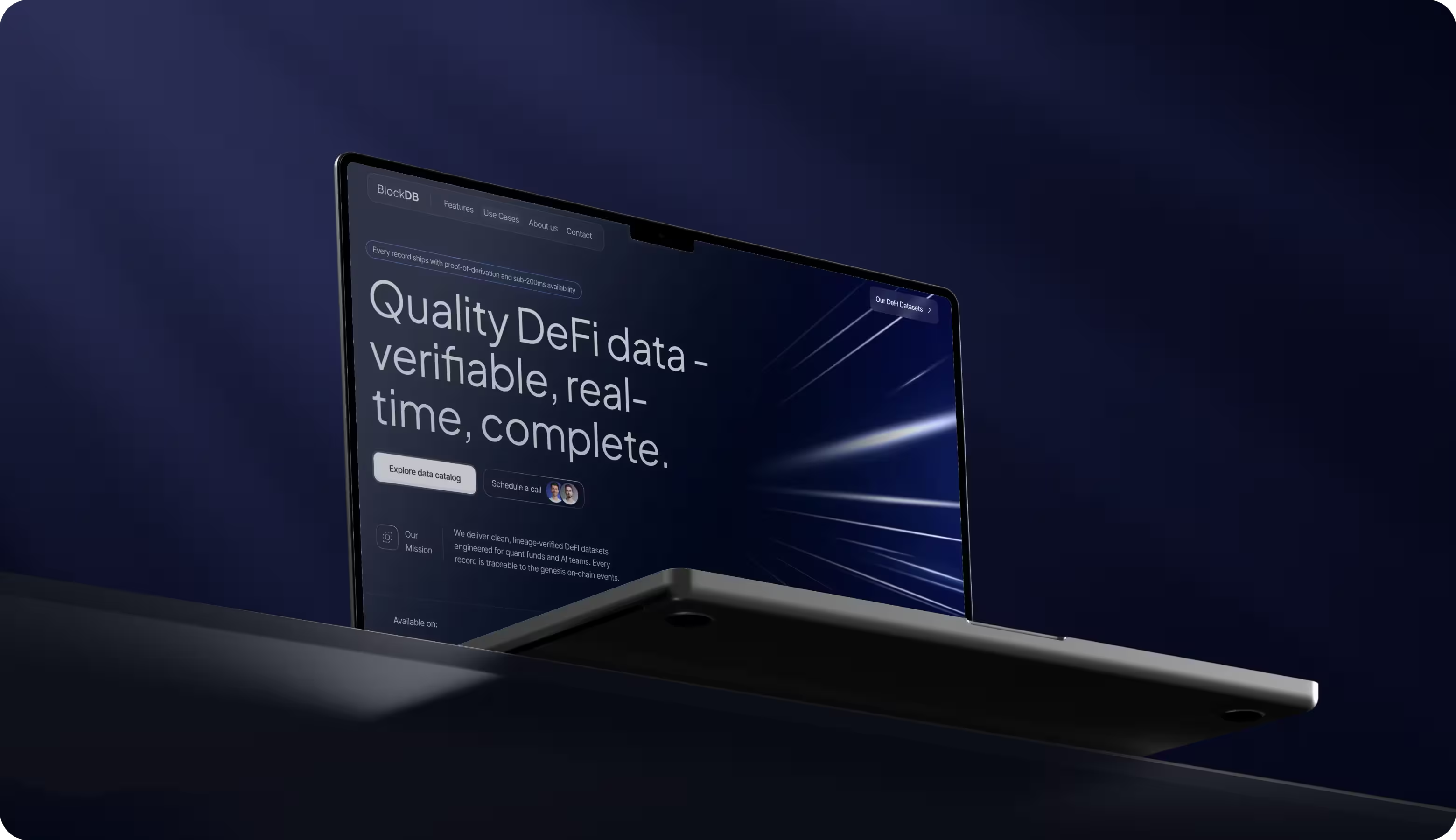
The result was:
- +58% scroll depth
- -33% bounce rate
- +48% qualified B2B inquiries
- +54% CTA click-through rate.
Technical Constraints That Shape Enterprise Software UX
Technical limitations shape UX/UI design for enterprise software at the level of access, performance, integrations, and system logic. We recommend considering each of the areas below early, since each one can affect usability in a different way.
Role-Based Access Control Design
Role-based access control shapes what users can see, do, and approve, so it directly affects speed and error rate.
Arounda design team recommends:
- Start with roles and responsibilities, then map permissions to real workflows
- Define what each role can view, edit, approve, and export
- Test “permission edges” early, especially shared tasks and handoffs between teams.
On-Premise vs Cloud Architecture Impact
Architecture decisions affect UX through latency, updates, data access, and reliability expectations.
Arounda design team recommends:
- Confirm hosting constraints early, including performance limits and release cadence
- Design for the expected speed and downtime rules, including offline or degraded states
- Align UX with IT requirements for data handling, logging, and integrations.
Single Sign-On and Authentication UX
Authentication problems quickly turn into blocked access, support requests, and lost time.
Arounda design team recommends:
- Map the full login flow, including first access, password reset, MFA, and session expiry
- Make error states clear enough for users to understand the next step immediately
- Test admin and user scenarios separately, since access issues often look different on each side.
Audit Trails and Compliance Features
These features matter when teams need visibility into actions, approvals, and sensitive changes.
Arounda design team recommends:
- Define which actions must be logged before design work goes too far
- Make confirmations visible for critical actions
- Give teams a clear way to review history when something needs to be checked or investigated
- Keep compliance signals understandable in the interface, especially around high-risk decisions.
Performance at Scale (10,000+ Users)
At scale, even small UX issues create visible business costs.
Arounda design team recommends:
- Check how the interface behaves under load, during delays, and when data takes time to appear
- Design feedback states for loading, retries, partial failures, and long-running actions
- Review which interactions may feel fine at a small scale but become frustrating with 10,000+ users
- If you plan to contract UX design partner for enterprise level solution implementation and rollout, make sure performance testing, phased rollout, and post-launch monitoring are part of the plan.
We know how demanding this kind of work can be, because we often help enterprise teams turn complex products into clearer, more credible digital experiences. One recent example is our work with PayPossible, a fintech platform connecting merchants, lenders, and banks. The company came to the Arounda team with an outdated website that did not clearly explain its multi-lender model or build enough trust with users.
Arounda’s team of designers rebuilt the website structure, introduced clearer step-by-step flows, improved navigation and calls to action, and developed the graphic design that made the financing model easier to understand.
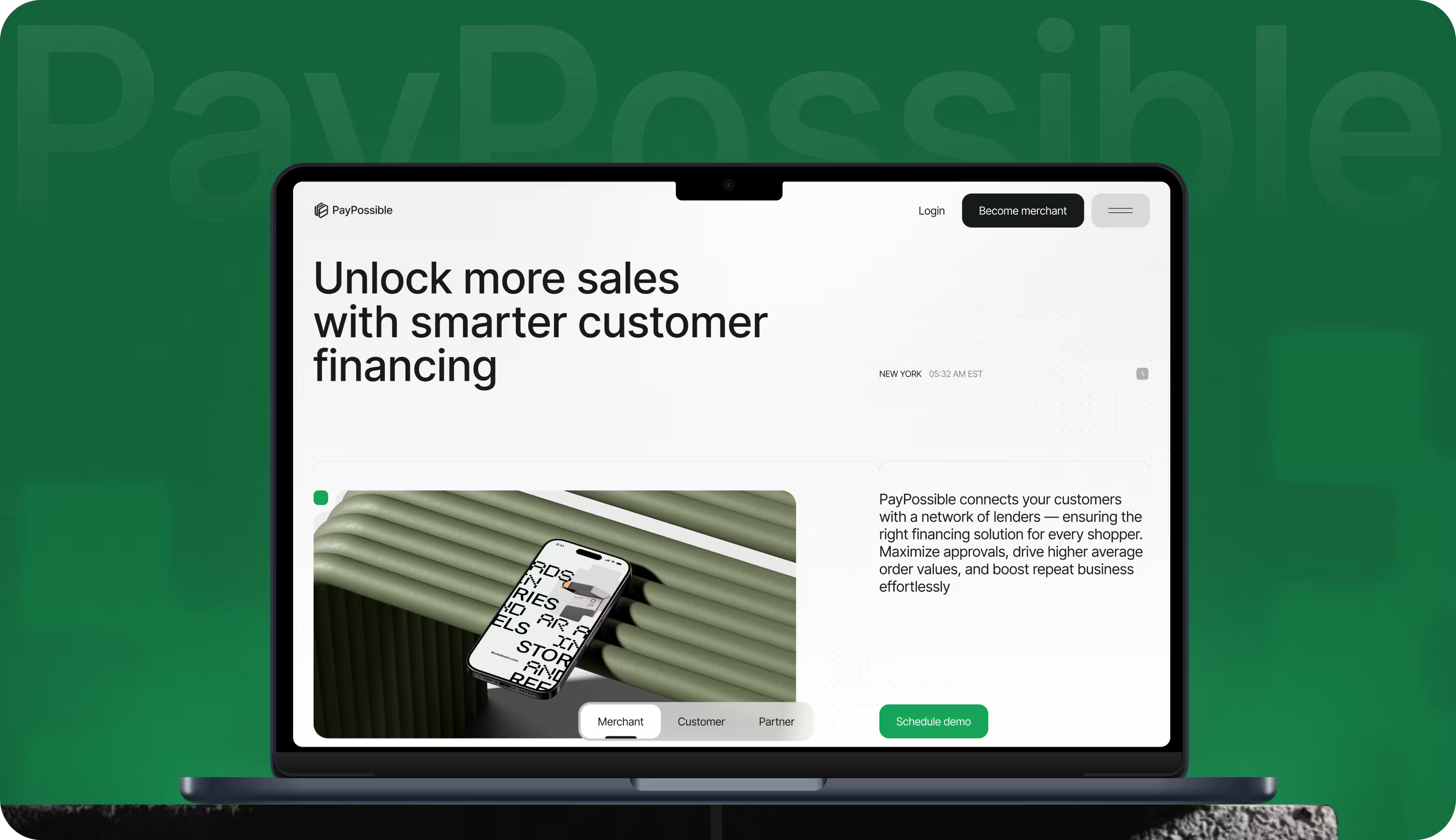
The results were:
- 2× merchant signups
- + 40% in completed financing applications
- + 88% user satisfaction score.
Designing for Different Enterprise Application Users
Designing for different user groups is a key part of the enterprise UX design, since one product often serves people with very different goals, contexts, and time pressures.
Power Users vs Occasional Users
- Power users rely on speed, shortcuts, and dense functionality because they live in the system all day.
- Occasional users need clarity, guidance, and low-risk paths since they return less often and forget details.
Keep advanced controls available, but make core tasks obvious and forgiving to reduce mistakes and support load.
Executive Dashboards vs Operational Interfaces
- Executives scan for trends, risk, and performance signals.
- Operators need detail, precision, and the ability to act fast.
Avoid forcing both audiences into the same view. Separate “overview” from “execution” so leadership gets clear signals, and teams on the ground get tools that support daily work without extra clicks.
Mobile Access for Field Workers
Field teams use mobile in imperfect conditions: limited time, small screens, and unstable connectivity. Prioritize a few high-value actions, larger touch targets, and clear status feedback. If data entry is required, keep it short and structured. Mobile enterprise UX works best when it supports real-world constraints, not full desktop parity.
Our work with Guestwise is a good example of why enterprise products need to account for different user types and device contexts.
The Arounda team redesigned the website and platform UI/UX to make complex marketing automation clearer for hospitality teams with different goals and usage patterns. We also delivered responsive layouts for desktop, tablet, and mobile, since teams often switch devices while running campaigns and checking performance.
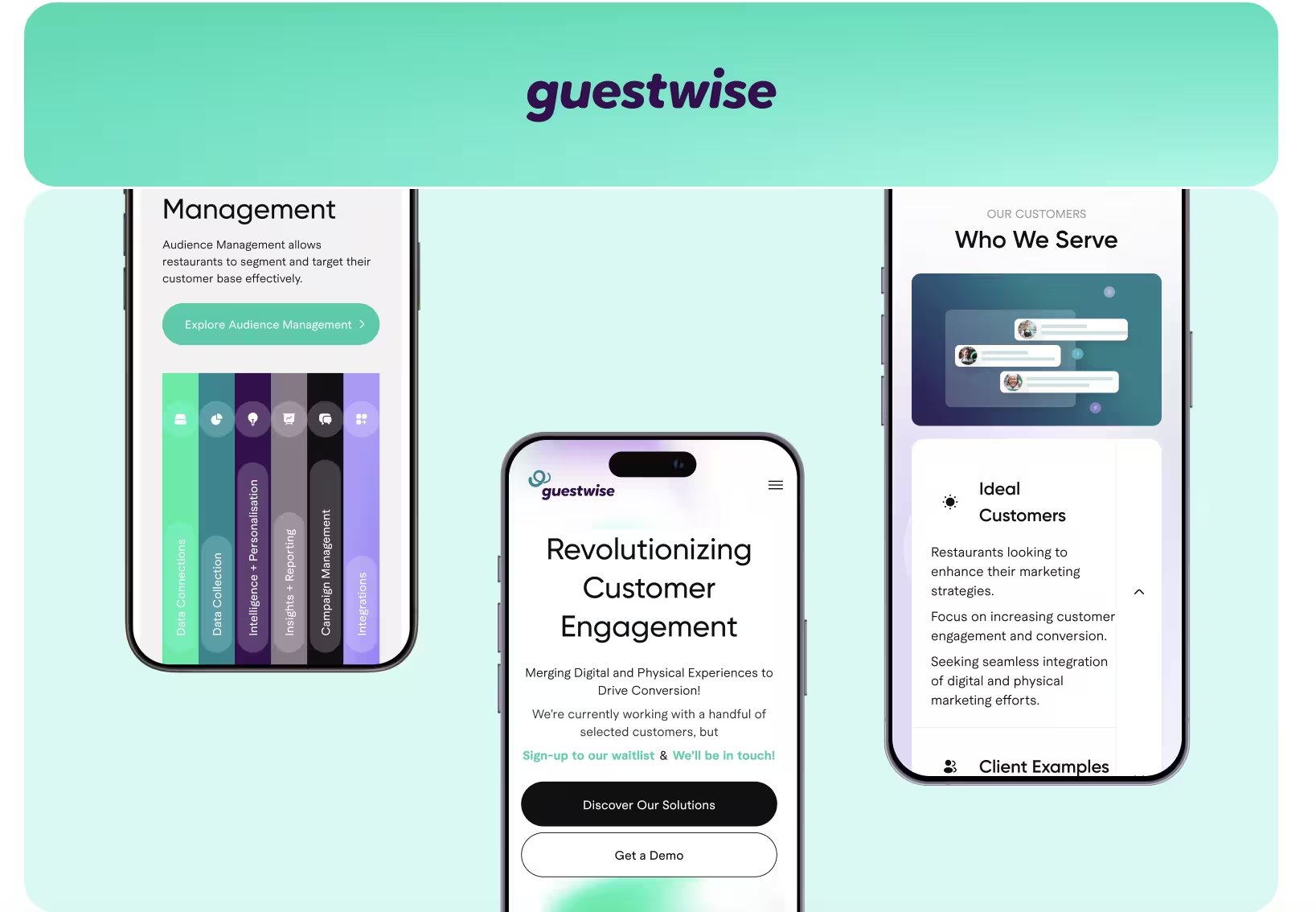
The redesign led to measurable results:
- + 27% higher conversion rate
- + 52% increase in feature engagement
- + 41% faster content discovery
- - 33% drop in bounce rate.
Common Enterprise UX Design Failures
UX design for enterprise apps often fails when teams try to simplify complexity without understanding how the product works. Very often, the same design problems appear again and again:
- Unclear navigation across roles and modules. Users spend more time searching for the right section or action.
- Permission logic that creates confusion. People see the wrong actions, miss required steps, or get blocked too late in the flow.
- Dense interfaces with weak hierarchy. Important information competes for attention and becomes harder to process.
- Workflows with too many steps. Simple tasks start taking longer than they should and create daily friction.
- Rollout decisions that ignore adoption. The product may be redesigned well, but teams still struggle to use it in practice.
AI in Enterprise UX: What Works & What doesn't
What We've Learned from 180+ Enterprise UX Projects
Enterprise work brings more complexity, more approvals, and more risk, so good UX has to support business goals, system logic, and real delivery conditions at the same time. Our Arounda team knows how to turn design decisions into measurable results by combining strategy, design, and development in one process.
If you are looking for high quality info about enterprise UX design, the strongest source is often the work itself and the results it drives.
That approach has helped us work with brands like Universal Music, WordPress, Chalhoub Group, Greif, Myso Finance, and Player’s Health, and deliver results such as +170% engagement, 4.6× revenue growth, +45% usability improvement, and +53% brand trust perception.
Our clients are often highly satisfied with our work, and our 5.0 rating on Clutch reflects that. One of our clients shared this feedback:
“Everything was done on time. The team is very structured, efficient, and transparent throughout the entire process. Speed, adjustability, strong communicators, excellent input and output, great advisors, everything you'd expect from working with an A-Class team. Their ability to understand the brand voice and the needs of our product's users was impressive.”
Founder & CEO, AI Automation Company
Wapping Up
Enterprise UX problems usually show up through friction, weak adoption, slower operations, and costly late-stage fixes. A more structured design approach will help enterprise teams reduce these risks and build a clearer, more scalable, and more effective product.
If you want your product to support growth, adoption, and operational efficiency, contact us. Our team will make sure your product is designed for clarity, scale, and real business impact.



Table of contents







FAQ
Enterprise UX tends to be more complex internally. You’re working with bigger permissions, more stakeholders, tighter governance, and workflows that require spanning departments more than crossing between the work of one team or a single clear user journey. B2B SaaS can be complex, but enterprise UX is so much more shaped by organizational reality.
It changes the product at a structural level. Navigation, visible actions, approval logic, and even terminology may need to shift from one role to another. In practice, that means role-based access control is not a backend detail. It is one of the forces that defines the UX.
Consumer systems are built around simplicity, speed, and repeated patterns. Enterprise products have to deal with restricted actions, exceptions, dense information, and traceability. A pattern that feels clean in a consumer app can create friction in enterprise software because it removes context that users actually need.
There is some correlation, but not a clean one. Larger companies tend to invest in UX once inefficiency becomes too expensive to ignore across teams, systems, and approvals. But maturity depends more on mindset than headcount. The real difference is whether UX is treated as interface styling or as part of how the business operates.
Access is limited, users are busy, and the people shaping the product are not always the people using it day to day. That changes the research model. When teams ask about what it is, best practices, examples, research in enterprise UX, the practical answer is usually mixed evidence: shorter interviews, workflow observation, internal stakeholder input, support data, and validation in smaller rounds.
Anything that depends on explanation tends to fail first. That includes unclear permissions, messy admin flows, weak search, overloaded dashboards, and onboarding that assumes someone will guide the user manually. At scale, the interface has to do much more of the teaching itself.


89+ Reviews
on Clutch

Top Rated Plus Agency
on Upwork

Top 50 Trending team
on Dribbble

Projects are Featured on Behance platform
